iHeartRadio for Google TV
- 3.6
- Rating
- 1.00M
- Installs
- Free
- Price

 Analysis by App-foxy
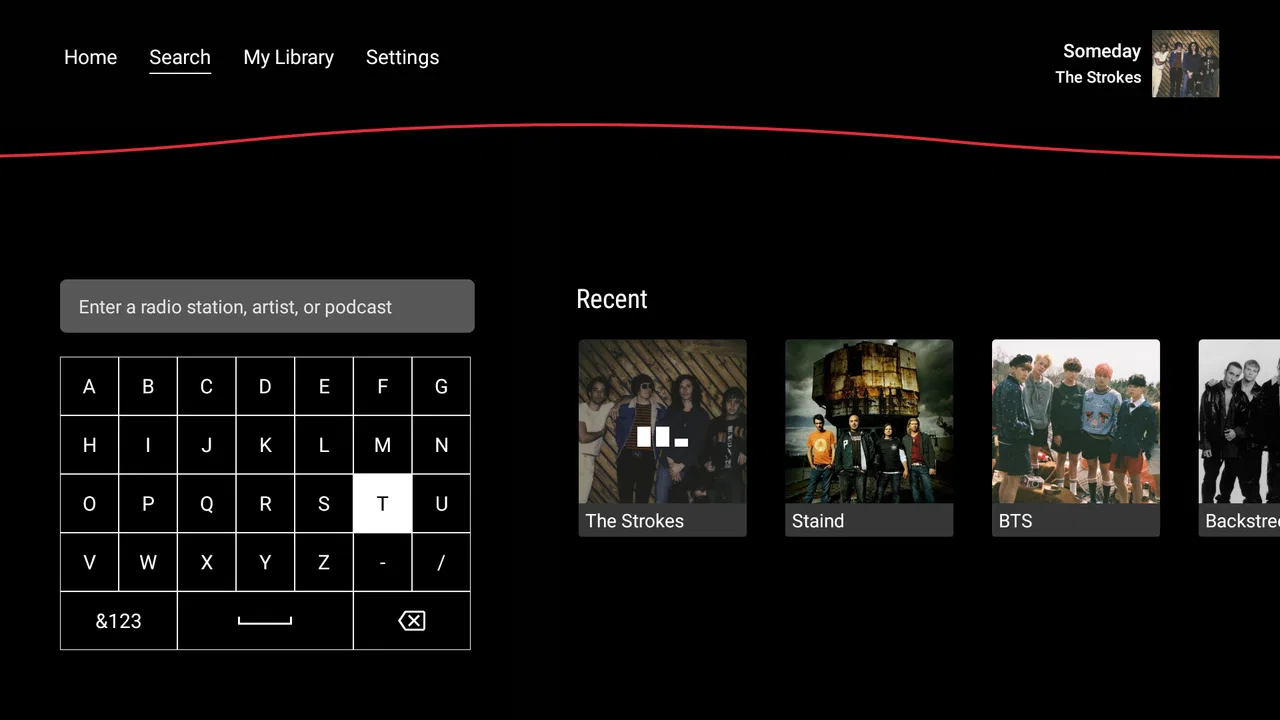
iHeartRadio for Google TV is the kind of music and audio app I reach for when I want sound in the room without turning the television into a complicated control panel. It brings live radio and podcasts to a big screen, and the basic service is free, which makes it useful for casual listening, background music, and keeping a familiar station on while I cook, work, or have friends over. It is developed by iHeartMedia, Inc. and sits in the Music & Audio category, but the television format gives it a different personality from a phone-based audio app.
My first impression is that this is less about building a perfectly organized personal library and more about making audio easy to start. On Google TV, I can use the remote, choose a station or podcast, and let the television handle the rest. That simplicity is its strongest quality. The trade-off is that the experience depends heavily on what I want to listen to. If I mainly enjoy live radio, familiar programming, and spoken shows, the app makes sense. If I want precise control over every album, file, playlist, or playback detail, a dedicated music service may suit me better.
How I use the app on Google TV
I use this section to explain the difference between a quick listen and a session I plan around a particular show. On Google TV, I find it helps to decide whether I want continuous live audio or a podcast before I start browsing, so the remote does not turn choosing into the main activity. That routine also makes the app easier to hand over to someone else in the room.
You May Also Like

 Blood Strike: 2.5 Anniversary
Blood Strike’s Loadouts Turn Every Drop Into a Tactical Gamble
A close look at Blood Strike’s custom loadouts: how fast access to signature weapons reshapes its battle royale rhythm, rewards preparation, and narrows the gap between fights.

 Pandora - Music & Podcasts
Pandora’s Music Is Easy to Start, but Harder to Recover
Pandora’s strength is its low-effort path from a seed to a station. Its weak spot is how much confidence it asks you to place in connection, setup, and quiet recovery.

 8 Ball Pool
 Is Built on Rivalries, Rematches, and Routine
A close look at the rivalries, rematches, shared routines, and unanswered safety questions that turn a quick pool match into a persistent mobile community.

 Samsung Music
’s Quiet Strength Is Playing What You Already Own
Its reach comes less from spectacle than from dependable access to a personal library. That simplicity is both the app’s strongest retention engine and its ceiling.

 AccuWeather: Weather Radar
AccuWeather Review: A Quick, Clear Forecast for Everyday Decisions
For everyday plans, the best forecast is the one you can understand quickly. AccuWeather makes rain timing, radar, and local conditions easy to act on, with a few trade-offs.

 Hill Climb Racing
Why Hill Climb Racing Still Turns Crashes Into One More Run
A tiny car, a bumpy hill and one more upgrade: Hill Climb Racing keeps resurfacing because its simple chaos makes every near-miss feel personal.
More From Our News Desk



A simple starting routine for live audio
My usual workflow begins with opening the app and choosing something that matches the moment rather than searching for a specific track. A live station works well when I want continuous listening without making decisions. I can start with music, leave it playing, and let the programming provide the rhythm for the room. That is particularly convenient on a television because the screen is already available, while the remote keeps the controls within reach.
For a relaxed evening, I prefer starting with a station instead of jumping directly into a podcast. Live audio feels more immediate and requires less commitment. I do not need to decide how long I will listen or remember where I stopped. When I want something more focused, I switch to podcasts and choose a show that fits the available time. This creates a useful two-mode routine: live radio for open-ended listening and podcasts for intentional listening.
One practical habit is to decide what kind of session I am starting before browsing. If I am preparing dinner, I choose a station and avoid spending too long moving through menus. If I am sitting down for a longer listen, I take a little more time to select a podcast. This sounds obvious, but it prevents the common television-app problem of spending more time choosing audio than actually hearing it.
Where the big-screen format helps
The Google TV setting gives the app a social advantage over phone listening. A phone is personal and easy to carry, but it is not always the best source for sound shared across a room. With iHeartRadio on television, I can put on audio that everyone nearby can hear without passing a device around. The screen also makes the current selection easier to identify than a tiny notification or lock-screen control.
I find this especially useful during ordinary household tasks. Imagine starting a station while making breakfast, then leaving the television on as people move between rooms. There is no need to keep checking a phone, and the audio can remain part of the background. For a small gathering, the same approach is more comfortable than asking one person to manage a phone connected to a speaker.
There is also a useful separation between visual entertainment and audio entertainment. I can use the television for sound without committing to a video. That makes the app a better fit for moments when I want company from music or conversation but still need to look away from the screen. The television becomes an audio appliance rather than something demanding my attention.
What the free service means in practice
The app is free to use, and its content rating is Everyone, so it is easy to consider for a shared family television. The free model is attractive for occasional listeners who do not want another regular subscription. It also makes experimenting easier: I can open the app, try a station or podcast, and decide whether it belongs in my routine without making a purchase first.
There are in-app purchases ranging from one dollar to just under ten dollars per item. I treat those as a reason to pay attention during setup and browsing, especially if children also use the television. The important point is that the free entry point does not mean every possible part of the experience should be assumed to work without any purchase. I would review what is shown on screen before confirming anything and keep the remote away from accidental taps when the app is being used casually.
Podcasts need a different listening habit
Podcasts are more deliberate than live stations. When I select one, I try to choose a show before I settle into another task, because browsing through spoken content can feel slower on a television remote than on a phone. Once I have found something suitable, the large-screen interface becomes less important and the audio takes over.
For longer episodes, I keep the remote nearby rather than assuming I will remember the exact point where I stopped. Television listening is comfortable, but it is not always as flexible as using a phone. If I expect to leave the room or continue elsewhere, I prefer to finish a natural segment before stopping. That small habit avoids the frustration of returning later and trying to locate the right place again.
This is one of the app’s important trade-offs. It works well when Google TV is the center of the listening session. It is less convincing when I want a seamless transition between television, car, headphones, and phone. People who move constantly between devices may prefer a service designed around synchronized personal listening.
Settings, shortcuts, and repeatable habits
Here I focus on the small checks and habits that make repeat use less fiddly, rather than assuming every pause or interruption needs a complicated fix. I find it useful to test how playback behaves when I briefly leave the app, then keep the remote close during longer spoken sessions. With that groundwork in place, it is easier to judge which conveniences belong to the app and which depend on the wider TV setup.
Settings I check before settling in
I do not treat the first successful playback as the end of setup. On a shared television, I check the app’s available options and the general Google TV audio behavior before relying on it for regular use. The goal is not to change every setting, but to make sure the experience matches the room: comfortable volume, sensible playback behavior, and a remote that remains easy to use.
Volume deserves special attention because television audio can feel very different from phone audio. I start lower than I think I need and adjust after the station or podcast has been playing for a moment. Live radio can vary in perceived loudness from one segment to another, while spoken content benefits from a level that keeps voices clear without making background sound tiring.
I also check how the app behaves when I leave it temporarily. If I need to open another television app, I want to know whether returning to iHeartRadio brings me back naturally or requires starting over. I make this part of my routine because it affects whether the app feels dependable during real household use, not just during a short test.
Making the remote work for you
The remote is both the app’s advantage and its limitation. It keeps the interface simple, but text entry and detailed browsing are slower than on a phone. I therefore avoid unnecessary searches. I choose familiar stations or shows when possible, and I use broad decisions such as “music for the room” instead of trying to construct a very specific queue from scratch.
A useful pattern is to keep the app’s most common destinations mentally grouped by purpose. I think of one option as my quick background choice, another as my spoken-audio choice, and anything else as occasional discovery. This reduces menu wandering. It is not a hidden feature; it is simply a repeatable way to use the television interface without asking the remote to do too much.
When I am introducing the app to someone else in the household, I show them only the actions they actually need: open it, select a station or podcast, pause, resume, and adjust volume. Teaching every menu at once makes a simple app feel harder. A short routine is more likely to be remembered, especially by guests or family members who do not regularly use Google TV.
Short sessions versus planned sessions
For short sessions, I start playback immediately and avoid exploring. This works well for ten or fifteen minutes of background sound while I handle a task. For planned sessions, I browse first, decide what I want, and then put the remote down. Separating those two modes keeps the app from becoming a source of distraction.
I also use a stopping rule for discovery. If I have moved through several choices without starting anything, I select the first reasonable option and listen for a few minutes. The point of a live radio app is partly to remove decision fatigue, so endless browsing defeats its purpose. If the choice is clearly wrong, I change it; otherwise, I let the programming do its job.
Another practical habit is to stop playback intentionally when the room no longer needs audio. Leaving a station running can be convenient, but it can also turn into unnoticed background noise. A deliberate pause makes the television feel more controlled and avoids having to remember what was playing later.
Using the app in a shared room
In a shared space, I choose content with the room rather than only my own taste in mind. A podcast may be excellent for one listener but awkward when people are talking, entering and leaving, or joining halfway through. Live music is often more forgiving in those situations because missing a few minutes does not matter as much.
For family use, the Everyone rating is reassuring as a general content classification, but I still make choices based on the specific station or podcast. A broad age rating does not remove the need for ordinary parental judgment about what is playing. I find that starting the audio myself and leaving the remote accessible is a better arrangement than letting younger users browse without guidance.
What experienced use cannot fix
Good habits make the app smoother, but they do not transform it into a full personal music-management system. The television interface remains less precise than a phone for searching, sorting, and moving between many selections. If my priority is a carefully ordered personal collection, I would rather use a service built around that purpose.
The same applies to portability. Google TV is excellent when I am staying in one room, but it is not the natural device for listening while walking, commuting, or moving around the house. I would choose a phone-based alternative when continuity between locations matters more than shared-room playback.
Where it fits among music and audio alternatives
I compare the app’s radio-and-podcast emphasis with services built around personal libraries, exact song selection, or listening across devices. My view is that the best alternative depends on where and how you listen: a shared Google TV room is a different use case from headphones on the move. That distinction helps clarify who will benefit from this approach and who may be happier with another audio option.
Why choose it over a music-only service?
The strongest reason is variety in format. iHeartRadio combines live music-oriented listening with podcasts, so I can move between a station and spoken audio without treating them as completely separate activities. That makes it a useful general audio destination on a television, particularly for people who enjoy radio’s sense of immediacy.
A music-only service is usually better when I want exact control: a particular album, a carefully arranged playlist, or a listening session that follows my personal library. Those services often feel more natural for headphone listening and device switching. iHeartRadio is more appealing when I want programming rather than a fully engineered queue.
Why choose it over ordinary television channels?
Traditional television channels are designed around video, while this app lets the television serve as a source of audio. That distinction matters when I want music or conversation without watching a program. It also avoids the need to keep a visual channel on merely to receive sound.
On the other hand, someone who already has a favorite television music channel may not gain much from adding another option. The app becomes more valuable when its mix of live audio and podcasts fills a gap that the existing television setup does not cover.
Who should skip it?
I would skip this app if my main requirement is a private, highly portable listening system with detailed library management and effortless movement between devices. I would also hesitate if I dislike live programming or prefer selecting every song myself. The service is not at its best when treated as a replacement for a fully controlled personal music collection.
I would also think twice if the television is rarely used for audio. Installing another app has little value when the household already relies on a phone, smart speaker, or another service that everyone understands. The best case for iHeartRadio is a Google TV that is already part of the room’s daily routine.
Performance, maturity, and everyday friction
The app has been available since June 2014, so it is not a new experiment in the audio category. The current version is 4.12.0, and it requires Android 5.1 or later. That broad compatibility is useful for people using older supported Android-based television hardware, although the overall experience can still depend on the particular Google TV device and remote.
Its average rating is 3.6 from around 335 ratings, with 51 written reviews, and the app has passed one million installs. I read those figures as a sign of a service with a meaningful audience but not universal approval. That matches my own view: the core idea is convenient, yet the right fit depends strongly on whether live radio and podcasts match the way someone listens.
The main friction comes from the television context rather than from the concept itself. Browsing with a remote is slower than browsing with a touch screen. A large display helps identify content, but it does not automatically make selection faster. I get the best results when I arrive with a general intention and avoid treating the app like a deep catalog that must be explored from top to bottom.
Another limitation is that shared-room listening encourages compromise. A station that works for cooking may not suit focused work, and a podcast that is excellent for one person may not work for a group. The app gives me access to different kinds of audio, but it does not decide which one belongs in the room. That judgment remains part of the experience.
My verdict after building a reliable routine
I recommend iHeartRadio for Google TV to anyone who wants free, straightforward access to live music and podcasts on a shared screen. I like it most as a room-filling audio tool: start a station, leave it running while handling everyday tasks, or choose a podcast when I want a more focused session. The app feels most natural when I use it with a small number of repeatable habits instead of constantly searching.
My best advice is to separate quick listening from planned listening, keep the remote close for longer podcasts, check the available settings before making the app part of a household routine, and remember that free access does not necessarily mean every optional element is free. Those habits address the real friction points without pretending the television interface can match a phone for detailed control.
The deciding question is not whether iHeartRadio can play audio, but whether its radio-first approach matches your room and your routine. If you want shared listening with minimal setup, it is a practical choice. If you want a perfectly organized library, precise song selection, or continuous movement between devices, another audio service will probably serve you better. For my own Google TV use, I see it as a convenient companion rather than a complete replacement for every kind of music app.
Because it is free, rated for Everyone, and supported by a long-running developer in this category, it is easy to try without much commitment. I would install it for a living room, kitchen television, or family space where audio needs to start quickly and remain uncomplicated. I would not make it my only listening tool, but as a dependable way to bring live programming and podcasts into the room, iHeartRadio earns a place in my regular rotation.
FAQs for iHeartRadio for Google TV
01What is iHeartRadio for Google TV?
iHeartRadio for Google TV is a streaming entertainment app designed for television screens. It provides access to live radio stations, music playlists, podcasts, news, sports, and other audio programming through a compatible Google TV device. The large-screen interface makes browsing easier from the sofa, although the experience is primarily focused on listening rather than watching video content.
02Is iHeartRadio for Google TV free to use?
The app can generally be downloaded and used without paying for a basic account, allowing access to many live stations, podcasts, and music features supported by advertising. Some content and functions may vary by location, while iHeartRadio subscription plans can provide fewer advertisements, additional music controls, and other premium benefits. Check the current terms and pricing before subscribing.
03Do I need an iHeartRadio account to use the app?
You may be able to start listening to selected stations or programs without creating an account, but signing in is recommended for a more complete experience. An account can help save favorite stations, follow podcasts, personalize recommendations, and synchronize preferences across supported devices. Availability of account features may depend on your country and the version installed on Google TV.
04What content can I listen to with iHeartRadio on Google TV?
iHeartRadio offers a broad selection of audio content, including live AM and FM-style radio stations, artist and genre stations, podcasts, news, talk shows, comedy, sports programming, and selected music features. The exact catalog is not identical everywhere because licensing and regional restrictions apply. Some stations or programs may therefore be unavailable in your location.
05What should I check before installing iHeartRadio for Google TV?
Before downloading, make sure your television or streaming device runs a compatible version of Google TV and has a reliable internet connection. You should also confirm that iHeartRadio is available in your region, since the service is not offered with the same catalog worldwide. A Google account, remote control, and optional iHeartRadio account may be needed for setup and personalization.
Pros
- Live radio
- podcasts
- and music are available in one TV-friendly app.
- The large-screen interface is easy to navigate with a remote control.
- Personalized stations help discover music based on favorite artists.
- Many radio stations and podcasts can be streamed without a subscription.
- Playback controls make it simple to pause
- skip
- or resume listening.
Cons
- Some features and content may vary depending on your location.
- Free listening includes advertisements that can interrupt playback.
- The app may require an iHeartRadio account for personalized features.
- Music selection is less flexible than fully on-demand streaming services.
- Performance can depend on your Google TV device and internet connection.

iHeartRadio for Google TV
Gallery